
AI最適化レイヤーをアンロック
標準の翻訳は単語を置き換えます。 MultiLipi LLM最適化 AI時代のためにコンテンツを再構築します。この機能を有効にすることで、「スマートレイヤー」がアクティブになり、翻訳を最適化します 文化的な関連性, 文脈上の正確さ、そして 生成エンジン最適化(GEO).
この機能により、多言語サイトが人間にとって読みやすいだけでなく、ChatGPT、Gemini、SearchGPTのようなAIエージェントによる発見のために構造的に最適化されます。
自然な翻訳のためにスマートなコンテキスト保持をアクティブ化します
ローカライズされたスキーマシグナルを注入してランキングを向上させます
プレミアムティアの翻訳モデルを有効にします
📌有効にする2つの方法:新しいプロジェクトを設定する場合と、既存のプロジェクトをアップグレードする場合に基づいて選択してください。
方法1:新しいプロジェクト設定中
MultiLipiに新しいウェブサイトを追加する際、オンボーディングフローで直接LLM最適化を有効にすることで、最初のクロールがAI対応であることを保証できます。
「プロジェクトの追加」フローを開始
ウェブサイトのURLを入力し、移動します ステップ2:言語を設定する.
ターゲット言語と業界を選択
- 翻訳したい言語(例:フランス語、ドイツ語)を選択します。
- 具体的に選択してください 業界 (例:SaaS、Eコマース)AIがドメイン用語を理解するのに役立ちます。
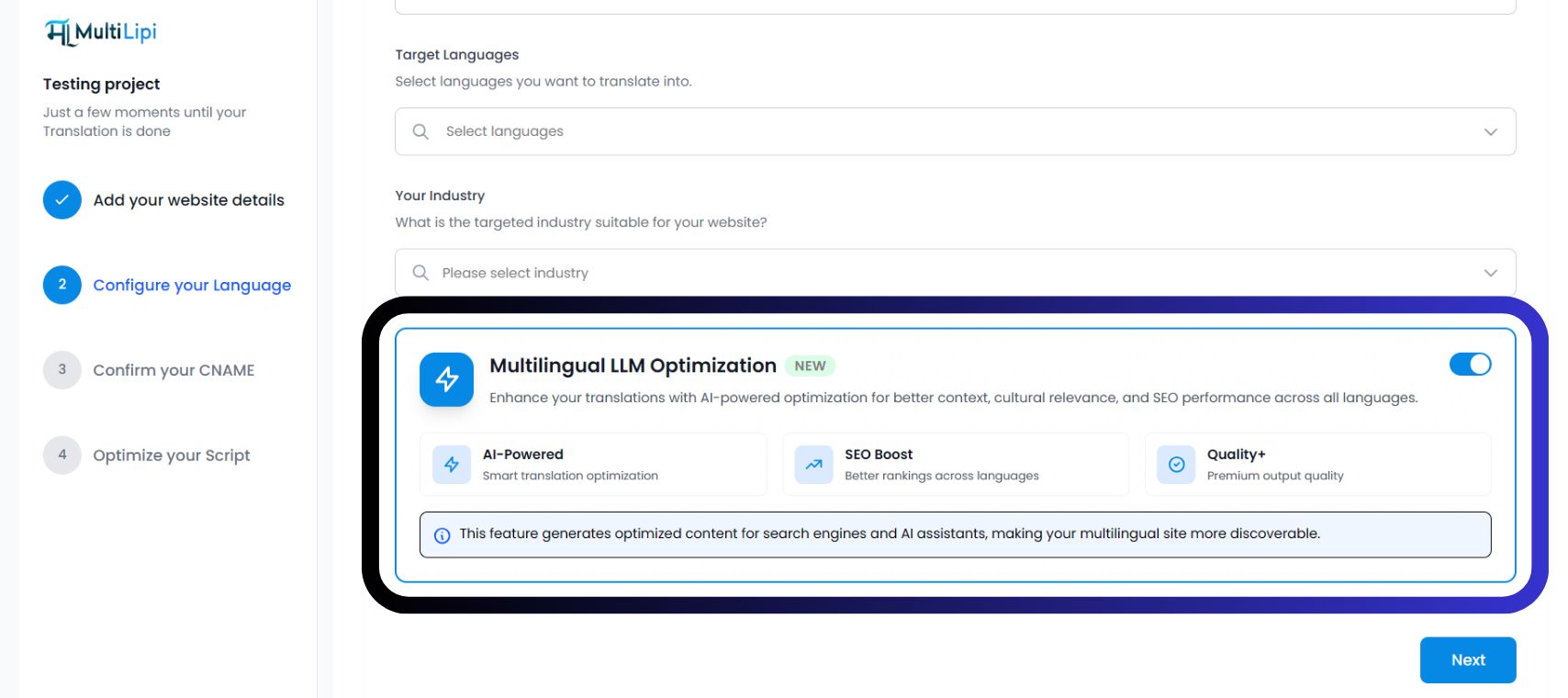
「多言語LLM最適化」を切り替えます
検索バーに「MultiLipi Translate」と入力します。 青色の最適化カードトグルを切り替えます オリヤー語 (青)。
3つのアクティブな確認バッジが表示されます。
「次へ」をクリック
CNAMEを確認し、スクリプトを最適化してください。プロジェクトは初日からGEO機能を有効にして起動します。
方法2:既存のプロジェクトの場合
すでにMultiLipiを統合している場合は、プロジェクト設定からいつでもLLM最適化を有効にできます。
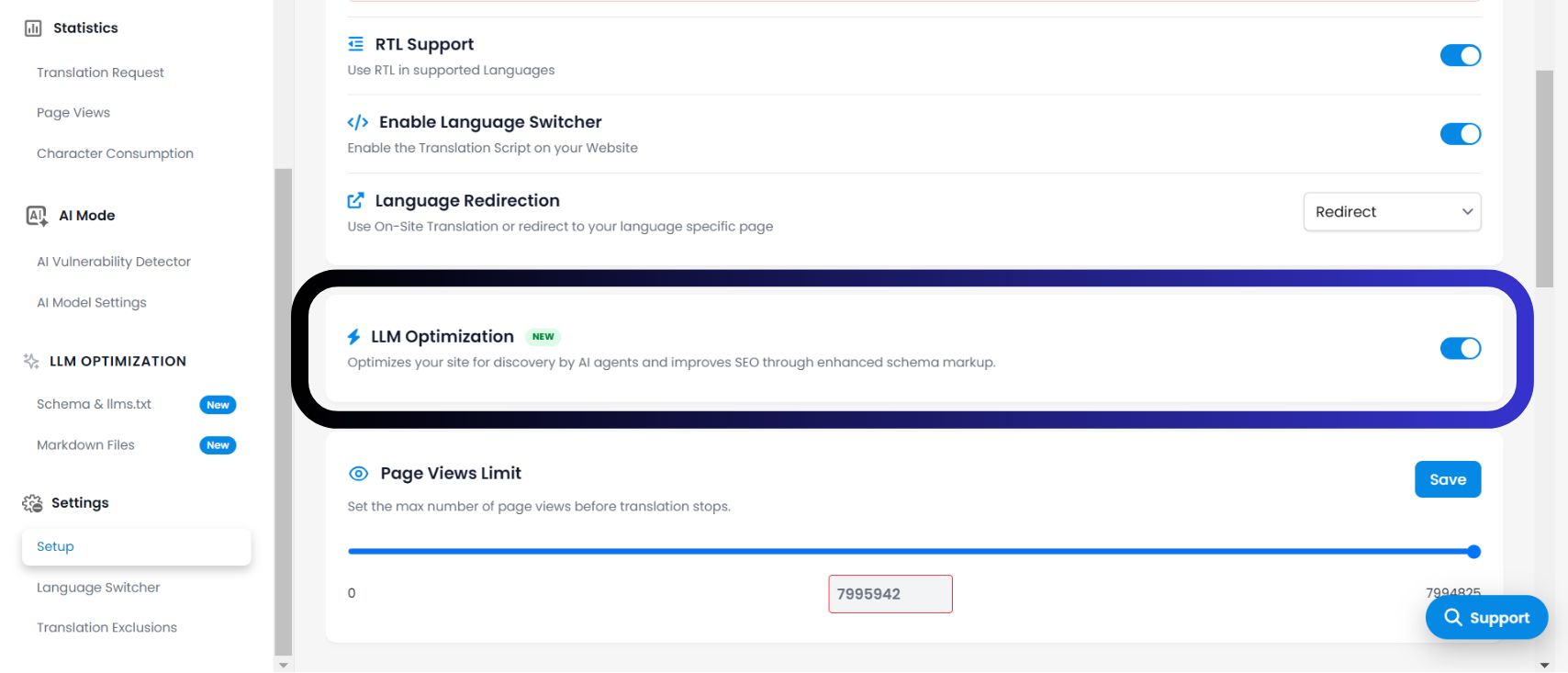
- 1プロジェクトダッシュボードにアクセスMultiLipiにログインし、サイドバーからアクティブなプロジェクトを選択します。
- 2セットアップに移動左側のメニューで、をクリックします 設定 を選択し、 セットアップ.
- 3最適化トグルの場所「言語リダイレクト」をスクロールして下に移動し、「 LLM最適化 セクション。 アクション: トグルを切り替えて オリヤー語.
- 4変更を保存システムはすぐにAI最適化シグナルを翻訳レイヤーに注入し始めます。新しいものが表示されます LLMの最適化 セクションがサイドバーに表示されます。
これを有効にする理由
ダッシュボードに表示されているインフラストラクチャによると、この機能を有効にすると3つの重要な利点が得られます。
1. AIによるコンテキスト(スマート翻訳)
基本的な翻訳とは異なり、このモードは「文化的コンテキスト」を理解します。イディオム、比喩、トーンをターゲット市場に合わせて適応させ、ユーザーの信頼を損なうロボット的または不自然な表現を防ぎます。
2. SEOブースト(多言語でのランキング)
コンテンツ構造を最適化します 発見これにより、Googleなどの検索エンジンやPerplexityなどのAI回答エンジンが翻訳されたページを正確にインデックスできるようになり、ローカルSERPでのランキングが向上します。
3. 品質+ (プレミアム出力)
このモードでは、エンジンに最高品質の翻訳モデルを使用させます。速度よりも精度と流暢さを優先し、ブランドボイスが100以上の言語で一貫性を保つようにします。
アクティベーションの確認方法
✅インフラストラクチャは更新されましたか?
有効にすると LLM最適化 トグルをオンにすると、ダッシュボードインターフェースが即座に進化します。システムがアクティブであることを確認するには、次のインジケーターを探してください。
専用セクションが表示されます LLMの最適化 左側のナビゲーションバーに表示されます。
プロジェクト概要で、言語リストの横に「AI搭載」または「SEOブースト」バッジが表示される場合があります。
アンロックされた機能
🎁 これをオンにすると何が得られますか?
この機能を有効にすることは単なる設定ではなく、それ以外は非表示になっている高度な「生成エンジン最適化」ツールのスイートのロックを解除します。このスイッチを切り替えることで オリヤー語にアクセスできるようになります。