HELP ARTICLE

RTL Support in MultiLipi

MultiLipi
MultiLipi 12/9/2025
5分 読む

In global typography, "Directionality" is critical. Languages like Arabic and Hebrew are read from Right-to-Left (RTL). If you simply translate the text without flipping the layout, the user experience feels broken (e.g., text aligns left, punctuation is misplaced).

MultiLipi's RTL Engine is a dynamic styling layer that detects these languages and automatically "mirrors" your website's CSS—flipping margins, padding, and text alignment—to ensure a native reading experience without requiring you to write a single line of custom code.

1. The Detection Protocol

Which languages trigger the flip?

The engine is context-aware. It only activates the layout mirror when a user selects a designated RTL language. For all other languages (English, French, etc.), standard Left-to-Right (LTR) rendering remains active.

Supported RTL Languages:

Arabic (ar)

Hebrew (he)

Persian / Farsi (fa)

Urdu (ur)

2. Configuration Protocol

Activating the mirror engine.

To enable this structural adaptation, follow this path in your command center:

Step 1: Access Project Context

Log in to your MultiLipi Dashboard.

Select the specific Project you wish to configure.

Step 2: Access Setup

Navigate to the Settings section in the left sidebar.

Click on Setup.

Step 3: Toggle Engine

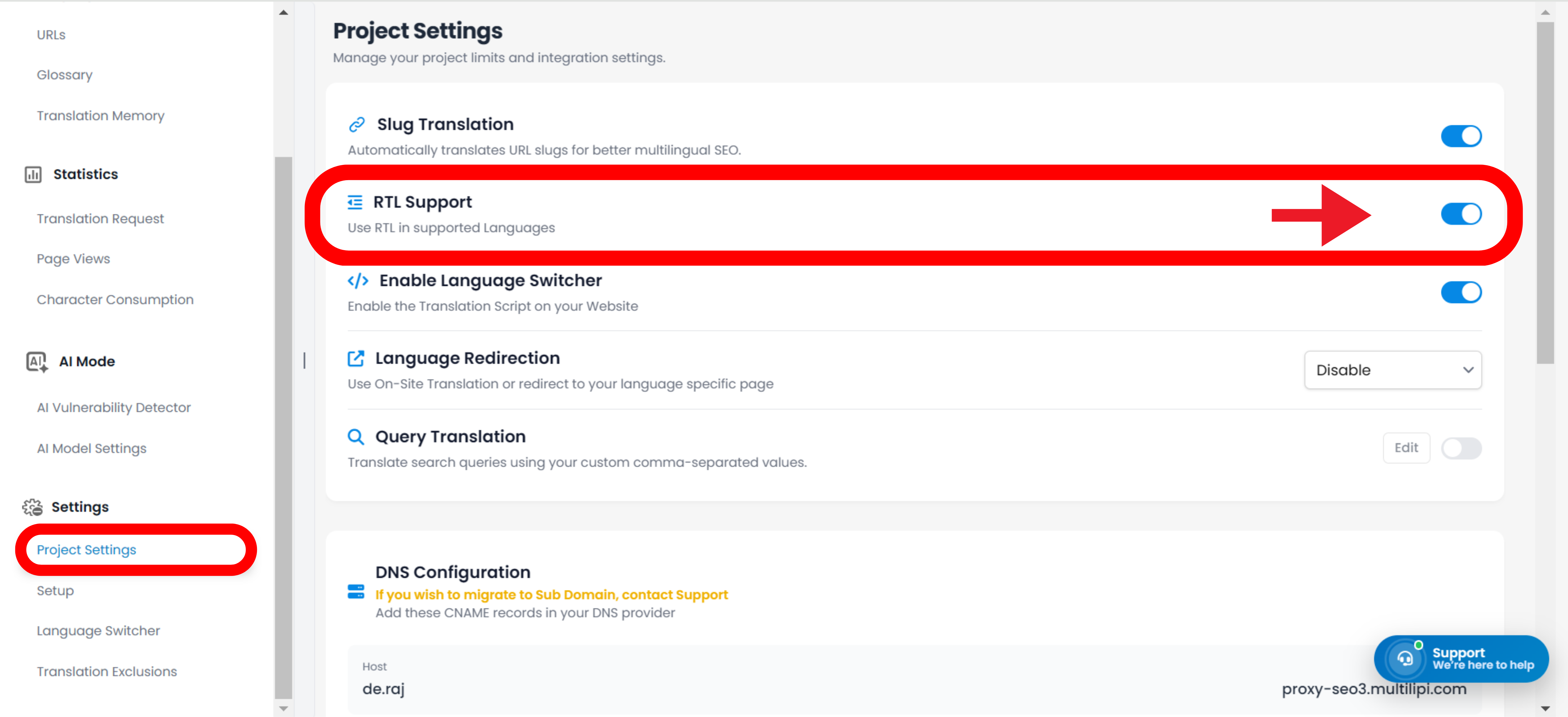
Scroll to find the RTL Support toggle.

アクション: Switch it to ON (Blue).

システムアクション: The CSS injection layer is now active.

Setup page showing RTL Support toggle highlighted with gradient border, along with Slug Translation, Enable Script, Language Redirection, and Page Views Limit settings

3. Technical Behavior

How it functions in the browser.

Once enabled, the engine performs the following operations dynamically:

Direction Attribute

Automatically injects dir="rtl" into the HTML <html> tag when an RTL language is active.

CSS Flipping

It virtually "flips" standard CSS properties.

float: left becomes float: right.

margin-left: 10px becomes margin-right: 10px.

Switcher Integration

If you use the MultiLipi Language Switcher, the UI will instantly flip orientation the moment a user selects Arabic or Hebrew, providing a seamless transition.

Note: No manual CSS overrides are required. The system handles the geometry calculations automatically.

Was this article helpful?

この記事では

共有

グローバル展開の準備はできましたか?

MultiLipiがコンテンツ戦略をどのように変革し、AI搭載の多言語最適化でグローバルなオーディエンスにリーチできるようになるか、ぜひご相談ください。

フォームにご記入いただければ、24時間以内に担当チームよりご連絡いたします。