ヘルプ記事

MultiLipiでURL、ブロック、または特定の単語を翻訳から除外する方法

マルチリピ
マルチリピ 6/19/2025
10分 読む

Not every pixel of your website requires localization. Legal disclaimers often need to remain in their original jurisdiction's language; code snippets must remain in English; and admin routes should never be indexed.

MultiLipiは、 Three-Tier Exclusion System—URL, Block, and Word—giving you surgical precision over what the AI ignores.

The Three Tiers of Exclusion

Before configuring rules, understand which level of control you need:

Page-Level (URL Rules)

アクション: Completely disables translation for an entire page or directory.

ユースケース: Admin panels (/app/*), User Settings, or "Legally Binding" English Terms of Service.

Component-Level (Block Rules)

アクション: Ignores content inside specific HTML elements (divs, spans) based on their CSS Class.

ユースケース: Code blocks (<pre>), proper nouns in headers, or complex third-party widgets.

Term-Level (Word Rules)

アクション: Prevents specific string matches from being processed.

ユースケース: Product model numbers or non-translatable technical jargon.

Accessing the Governance Engine

To define your negative logic:

  1. Navigate: Open your MultiLipi Dashboard and select your active project.
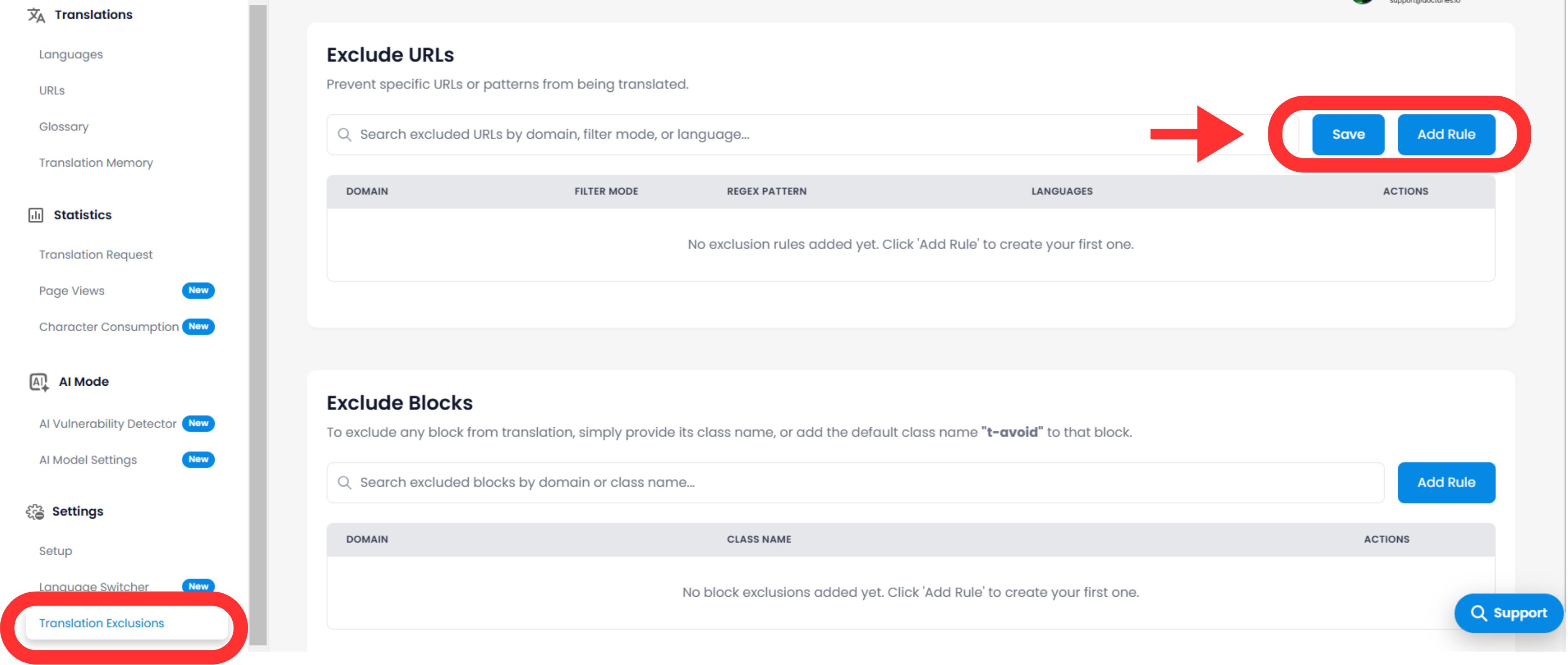
  2. Locate Settings:サイドバーでスクロールして 設定 を選択し、 翻訳の除外 .
  3. Interface: You will see a list of active rules separated by category (URLs, Blocks, Words).
MultiLipi Translation Exclusions settings page showing Exclude URLs and Exclude Blocks sections with Add Rule buttons highlighted, displaying empty state with prompts to create first exclusion rules

Configuring Logic Rules

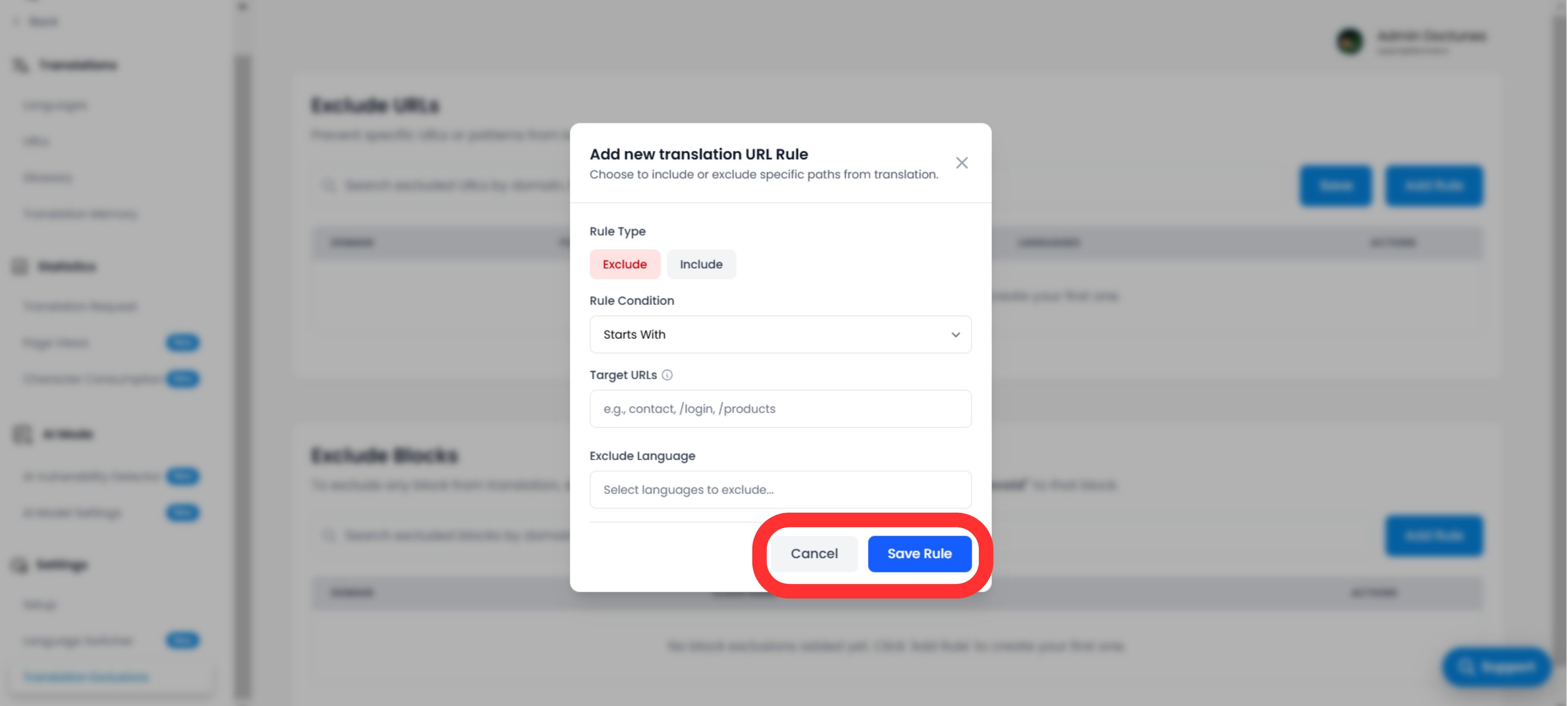
をクリックします Add Rule button to define a new constraint.

A. Defining the Pattern

You must tell the engine how to match the content:

Rule Type:

  • Starts With: Best for directories (e.g., /blog/ excludes all blog posts).
  • Ends With: Best for file types (e.g., .pdf).
  • Contains: Wildcard match for any URL containing a specific string.
  • Exact Match: Targets a single specific page.

Value:

Enter the path, CSS class name (without the . ), or word.

B. Scope & Behavior

Languages:

Apply the rule globally (All Languages) or restrict it to specific locales (e.g., Exclude /プライシング only in French).

Switcher Visibility (Critical UX)

Toggle: "Hide Language Switcher"

インパクト: If you exclude a page (like a login screen), you likely want to hide the language switcher on that page so users don't try to switch languages and see nothing happen. This toggle automates that UX cleanup.

Add new translation URL Rule modal dialog showing configuration options including Rule Type (Exclude/Include toggle), Rule Condition dropdown set to Starts With, Target URLs input field, Exclude Language selector, and Cancel/Save Rule buttons

Execution & Verification

クリックすると、 Save Rule:

Immediate Propagation

The rule is pushed to the edge network instantly.

Cache Purge

We automatically purge the cache for the affected paths to ensure the "Untranslated" version is served immediately.

戦略的ユースケース

ルールの種類 シナリオ Configuration
URL RuleUser Dashboard: You want the public site translated, but the logged-in app (/app/...) to remain in English.
Type: Starts With
Value: /app/
Block RuleCode Snippets: You run a dev blog and want the tutorial text translated, but the code examples must remain valid code.
Type: CSS Class
Value: code-snippet
URL RuleRegional Legal: Your Terms of Service are only valid in English.
Type: Exact Match
Value: /条件

この記事は役に立ちましたか?

この記事では

共有

グローバル展開の準備はできていますか?

MultiLipiがあなたのコンテンツ戦略をどのように変革し、AI搭載の多言語最適化で世界中のオーディエンスにリーチできるかについて話しましょう。

フォームにご記入いただければ、24時間以内にチームがご連絡いたします。