ヘルプ記事

MultiLipiで用語集のルールを作成する方法(翻訳の例外)

マルチリピ
マルチリピ 6/19/2025
5分 読む

AI translation models are powerful, but they can be too creative. A glossary acts as a "Guardrail Layer," forcing the translation engine to adhere to your specific brand rules. Whether it's ensuring "Apple" remains a brand name (and not a fruit) or keeping legal disclaimers verbatim, the MultiLipi Glossary Manager gives you absolute control.

This guide covers the two methods for defining these rules: Manual Entry (Precision)そして CSV Ingestion (Bulk).

Enforce Strict Terminology Consistency

Glossaries override AI translation decisions to maintain brand integrity. Use them for company names, product SKUs, legal terms, technical jargon, and high-value SEO keywords that must remain consistent across all languages.

Accessing the Term Base

The Glossary is a global setting that applies across all your projects.

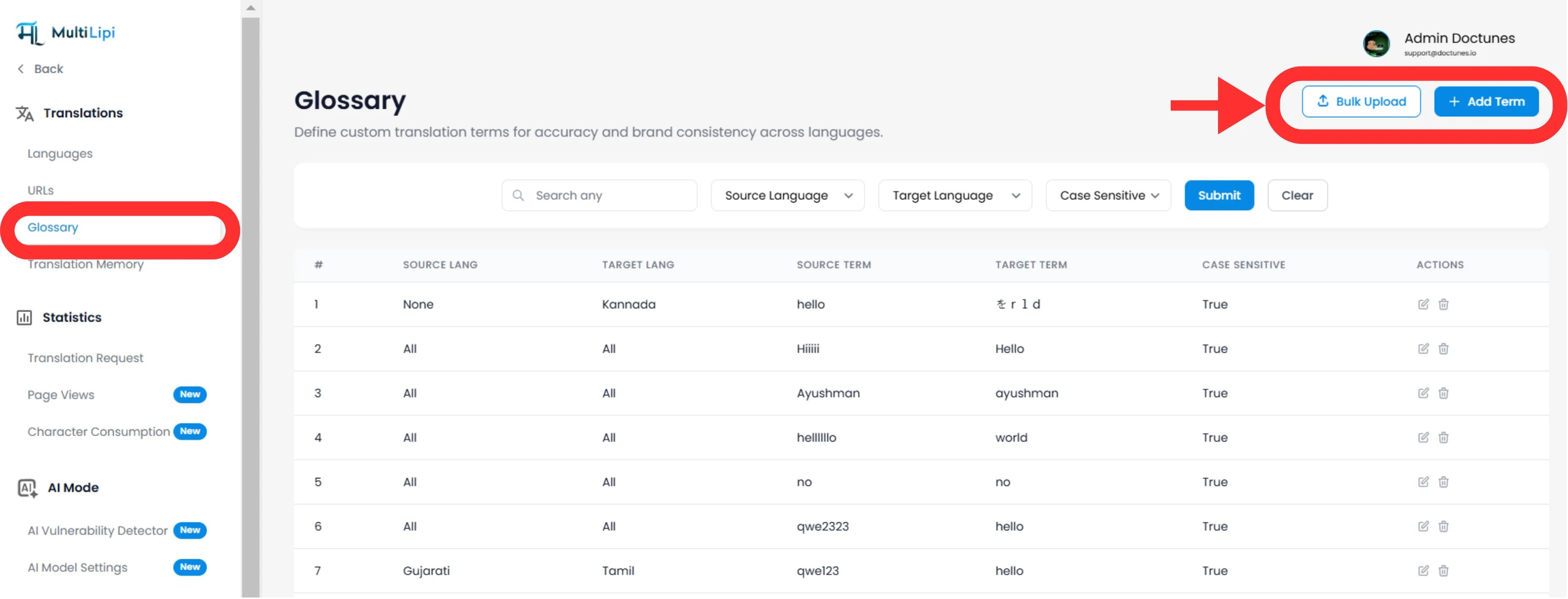
Navigate: From your MultiLipi Dashboard, expand the 翻訳 menu in the sidebar.

Select:クリック 用語集 .

View: You will see a searchable table of all active rules, their language pairs, and case-sensitivity status.

MultiLipi Glossary page showing term list with Bulk Upload and Add Term buttons highlighted

Method 1: Precision Rule Definition (Manual)

Best for:

Locking brand names, product SKUs, and specific marketing slogans.

1

Initiate

をクリックします 新機能 右上隅にあるボタン。

2

Define the Rule

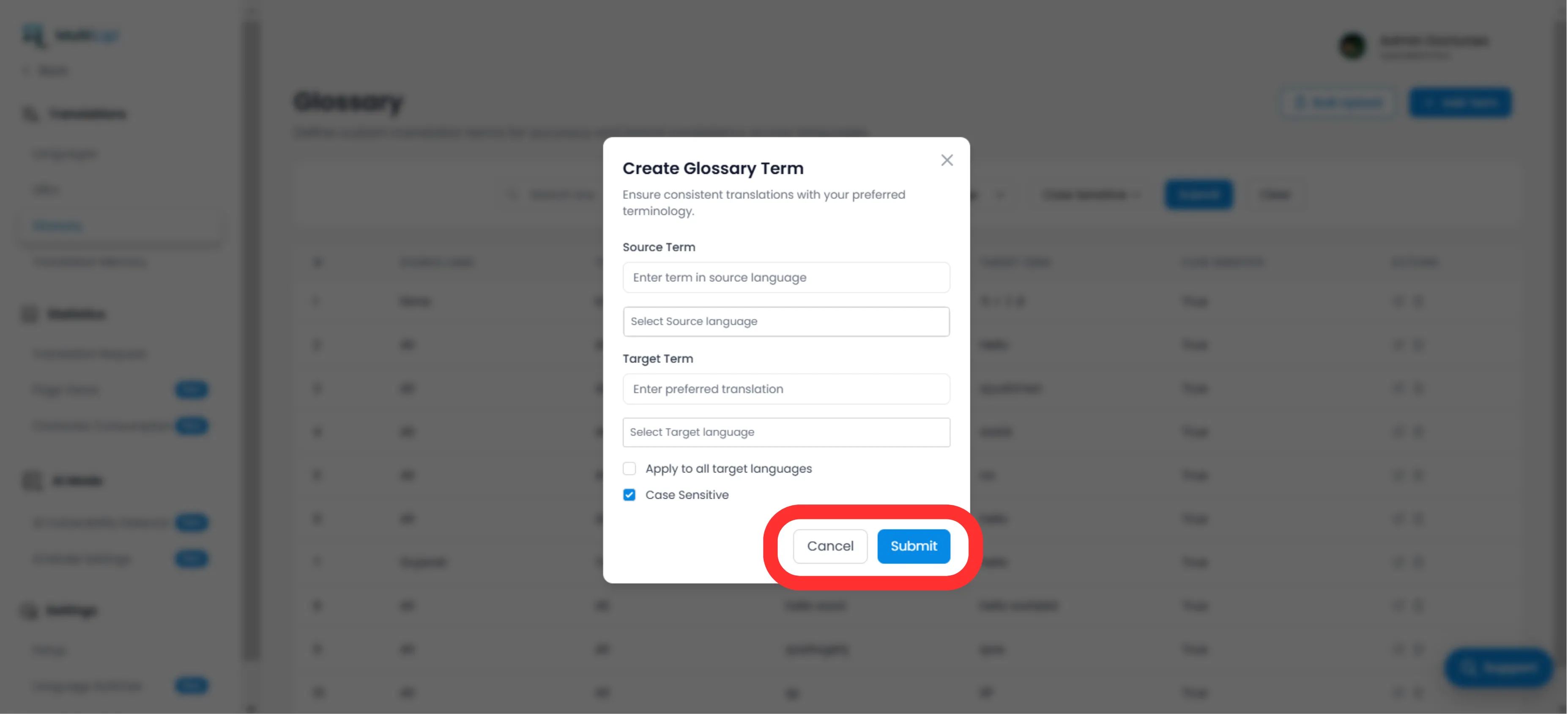
ソース用語

The exact word or phrase in your original language (e.g., "CloudDrive").

対象用語

The mandated translation (e.g., "CloudDrive" - to keep it in English, or "Le CloudDrive").

Language Scope

Specific

Apply only to EN → FR .

グローバル

選ぶ "All Languages" to lock a brand name worldwide.

Case Sensitivity

Enabled

Matches "Apple" but ignores "apple". Essential for common words that are also proper nouns.

Create Glossary Term modal dialog showing Source Term, Target Term, language selection dropdowns, and Case Sensitive checkbox
3

展開

クリック 送信 . The rule is instantly pushed to the translation engine and will apply to all future translations.

Method 2: Bulk Ingestion (CSV Upload)

Best for:

Migrating legacy term bases, legal dictionaries, or e-commerce product lists.

If you have hundreds of terms, do not enter them manually. Use our CSV import tool.

1

Prepare Your Data

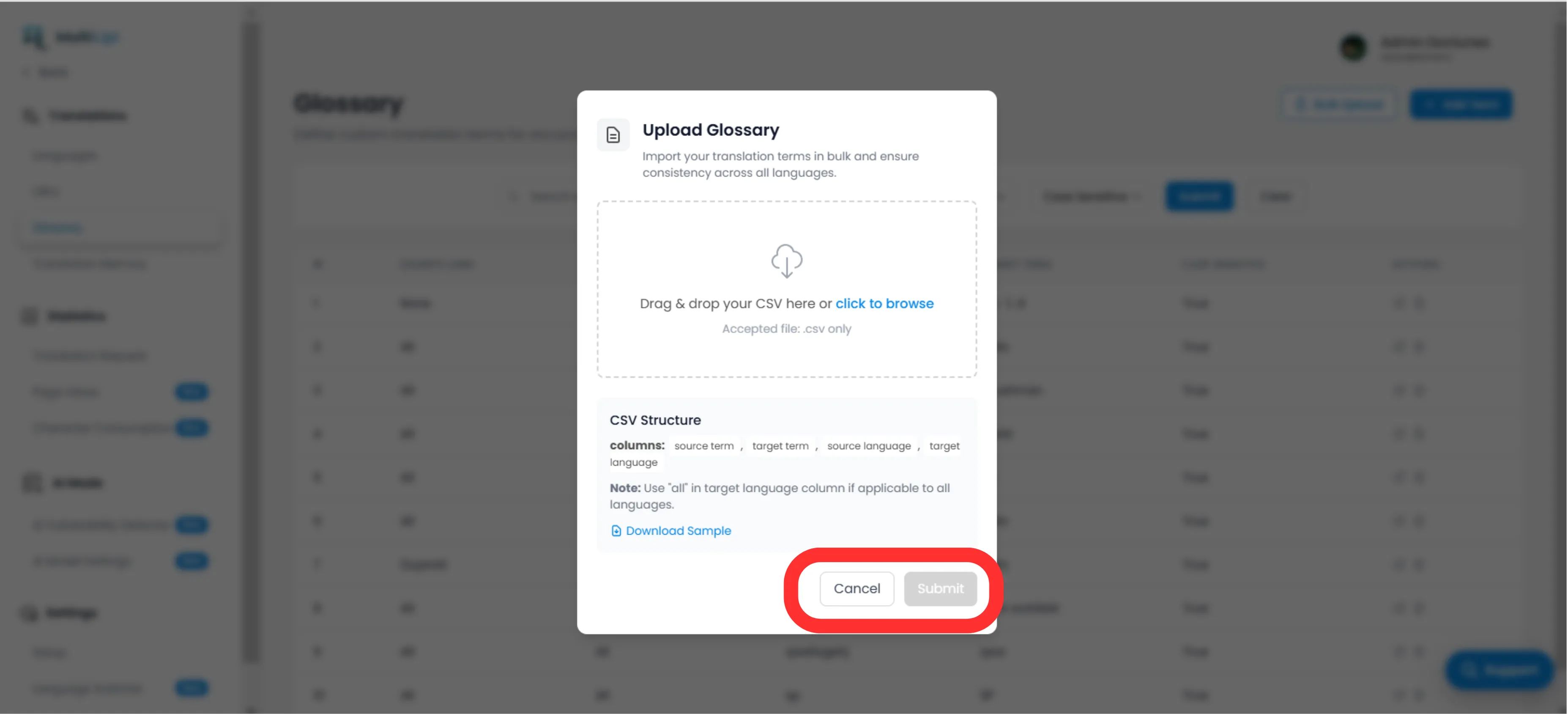
Create a CSV file with the following header structure:

source_term、target_term、source_language、target_language

手記

使う ISO codes for languages (e.g., ja , fr , ). Use すべての for global rules.

2

アップロード

をクリックします アップロード button in the Glossary panel.

MultiLipi CSV Upload Modal
3

Map & Validate

Select your file. The system will parse the rows and flag any formatting errors.

4

Execute

クリック 送信 to ingest the rules into your active Term Base.

Strategic Best Practices

Lock Your Brand

The first rule you should create is for your 会社名 . Set the target to be identical to the source and apply it to All Languages.

SEO Keywords

If you're targeting a specific high-volume keyword in Germany (e.g., "Handy"代わりに "Mobiltelefon"), create a glossary rule to force the engine to use the higher-traffic term.

Keep it Short

Glossaries work best for 1-3 word phrases. Do not use them for entire sentences; use the 翻訳メモリ 又は ビジュアルエディター for that.

Ready to enforce brand consistency? Open the Glossary Manager and start defining your translation guardrails today.

この記事は役に立ちましたか?

この記事では

共有

グローバル展開の準備はできていますか?

MultiLipiがあなたのコンテンツ戦略をどのように変革し、AI搭載の多言語最適化で世界中のオーディエンスにリーチできるかについて話しましょう。

フォームにご記入いただければ、24時間以内にチームがご連絡いたします。