

"Linguistic Assets" act as the immutable laws of your multilingual infrastructure. Instead of relying on individual translators or AI models to "guess" the right word, you define centralized rules that propagate across every project, subdomain, and page in your account.
This guide details the two core components of this governance layer: Glossaries (Rule Enforcement) and Translation Memories (Asset Reuse).
1. The Asset Architecture
Two pillars of consistency.
A. Glossary Terms (The Rulebook)
Function: A "Hard-coded" dictionary that overrides AI suggestions.
Mechanism: If you define "Smart Billing" = "Facturación Inteligente", the system will always force this specific translation, ignoring any other potential variations.
Scope: You can define terms per language pair, control case sensitivity, and assign them to specific domains or globally across all projects.
B. Translation Memories (The Archive)
Function: A dynamic database of every sentence you have ever translated.
Mechanism: When the system detects a sentence that matches a previous translation, it retrieves the approved version from the memory instead of generating a new one.
メリット: Ensures that identical content (like footers or legal disclaimers) is never translated differently twice.
2. Strategic Benefits
Why centralize your linguistic data?
Governance
Changes made here apply to all projects. Updating a product name in the Glossary propagates that change globally.
SEO Integrity
"Lock" your high-value keywords. If you rank for "Cloud ERP" in Germany, the Glossary ensures that term is never accidentally translated into a lower-volume synonym.
Operational Efficiency
Reduces manual editing by establishing a "Do Not Translate" or "Translate As" list before the AI even begins its work.
3. Configuration Protocol
Manage these assets directly from the central command view.
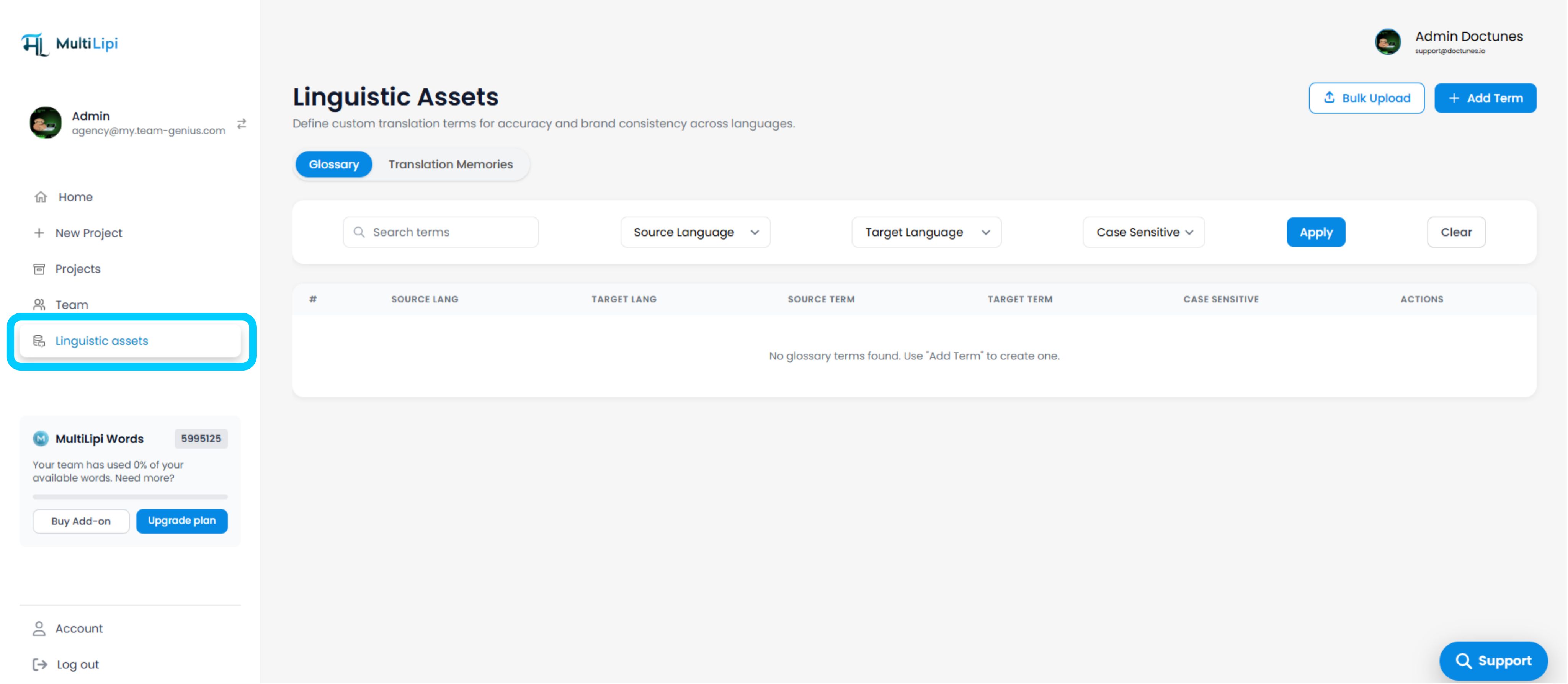
Step 1: Access Asset Manager
Log in to your MultiLipi Dashboard.
Navigate to Linguistic Assets in the main menu.
Step 2: Select Asset Type
Choose the specific database you wish to modify: Glossary or Translation Memories.
Step 3: Ingest Data
Manual Entry: Click Add Term to define a single rule.
Batch Import: Click Bulk Upload (CSV/TMX) to ingest an existing brandbase.
Step 4: Define Constraints
Input the Source Term (Original) and Target Term (Translation).
Select the Language Pair (e.g., English → Spanish).
Assign Domains (Select specific projects or apply globally).
Step 5: Commit
Click Submit to activate the rule.
System Action: The asset is now live. All future translations will adhere to this new constraint.
4. Use Case: The "Brand Lock"
Scenario: Enforcing Product Identity.
Imagine your SaaS product has a feature called "Smart Billing".
Without Glossary
AI might translate this as "Facturation Intelligente" on the pricing page, but "Facturation Malin" on the support page.
With Glossary
You define the rule once. MultiLipi forces "Facturation Intelligente" across every single URL, ensuring your brand trademark remains uniform.