

新しい市場への進出には、翻訳以上のものが必要です。専用の URL構造, SEOインデックス作成、そして コンテンツ配信ネットワーク。MultiLipi はこの複雑さを抽象化し、ダッシュボードから言語エンドポイント全体を即座にデプロイ(または廃止)できるようにします。
このガイドでは、言語のライフサイクルについて説明します。 プロビジョニング, 設定(フォント/RTL)、そして 廃止.
ワンクリック市場プロビジョニング
新しい言語ごとに手動で設定が必要な従来の翻訳プラグインとは異なり、MultiLipiはサブディレクトリまたはサブドメイン、hreflangタグ、XMLサイトマップエントリ、ローカライズされたメタデータなど、必要なインフラストラクチャをすべてワンクリックで自動的にプロビジョニングします。
1. プロビジョニング(言語の追加)
数秒で新しい市場をローンチ。
言語を追加すると、MultiLipiは必要なリソースを即座にプロビジョニングします。 サブディレクトリ (例: /de/)または サブドメイン (例: de.site.com) とトリガーします ニューラル翻訳エンジン コンテンツのインデックス作成を開始します。
デプロイメントプロトコル
インフラストラクチャへのアクセス
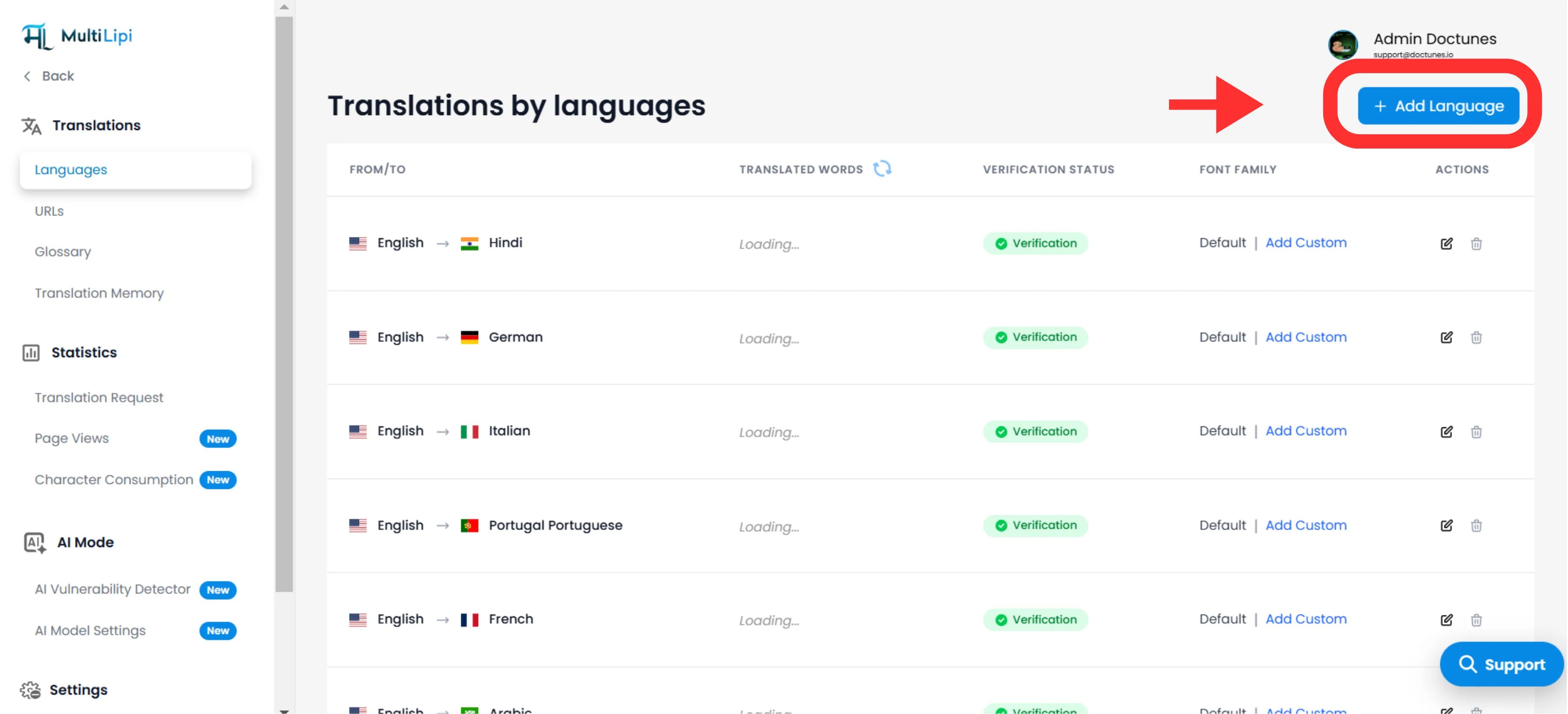
に移動 翻訳 > 言語 ダッシュボードのサイドバーにあります。
デプロイメントを開始
クリック 言語を追加 右上隅にあります。
ロケールの選択
から選択してください 100以上のサポート言語.
戦略的注記
具体的に選択してください。 スペイン語(メキシコ) 対 スペイン語(スペイン) hreflangタグとSEOターゲティングを変更します。
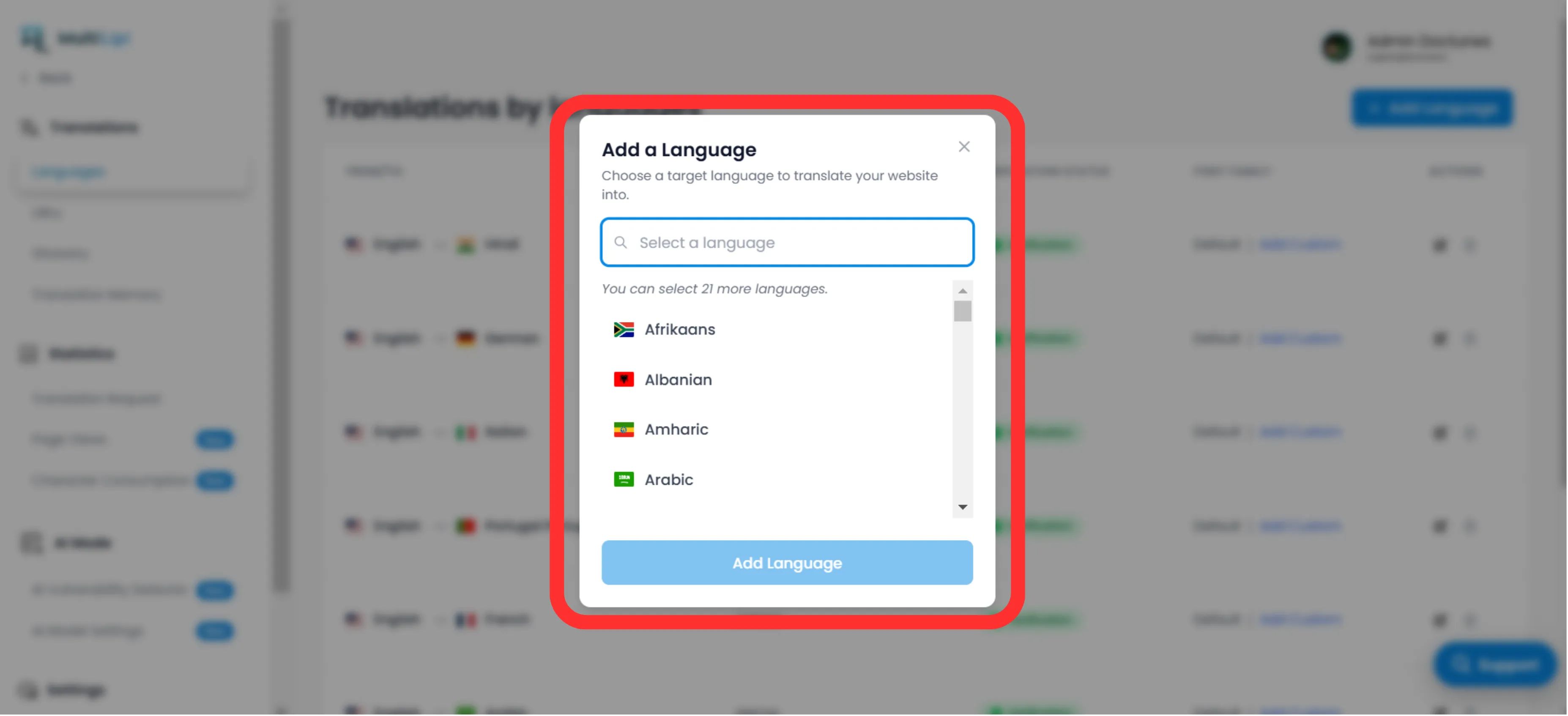
実行
クリック 追加。エンドポイントは現在ライブであり、インデックス作成が開始されます 即座に.
2. 設定とローカライズ
スクリプト全体で可読性を確保します。
言語の展開は最初のステップにすぎません。ローカルユーザーに対してスクリプトが正しくレンダリングされることを確認する必要があります。
タイポグラフィ(フォントファミリー)
言語によって必要な視覚的な重みは異なります。 言語グリッド、 「フォントファミリー」 列に特定のウェブフォントを割り当てます。
例
使用 「Noto Sans JP」 日本語については、明確な文字定義を確保しつつ、 'Inter' 英語の場合。
方向性(RTLサポート)
中東などの市場では(アラビア語, ヘブライ語, ペルシャ語)、MultiLipiはロケールを自動的に検出し、CSSレイアウトを 右から左へ (RTL)。手動コーディングは不要です。
自動検出: アラビア語、ヘブライ語、またはペルシャ語を追加すると、システムは自動的に適用されます dir="rtl" テキストの流れとレイアウトのミラーリングを正しく行うため。
3. 廃止(言語の削除)
パフォーマンスの低い市場を効果的に縮小します。
戦略的でなくなった地域や、翻訳クォータを回復する必要がある場合は、言語のプロビジョニングを解除できます。
エンドポイントの場所
で 言語 パネルで、対象の行を見つけます。
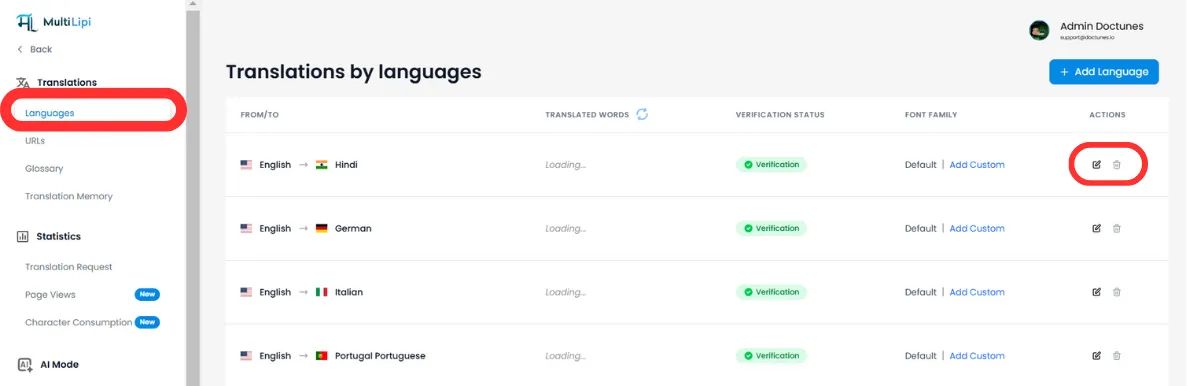
削除を実行
クリック ゴミ箱/削除アイコン 「アクション」列で。
確認
⚠️ 重要警告
言語の削除 エンドポイントを即座に停止しますへのトラフィックはすべて /fr/ (例えば)は 404 エラーこの言語にインデックスが作成されたページがある場合は、設定することをお勧めします 301リダイレクト 削除前にサーバーレベルで設定してください。
概要:インフラストラクチャへの影響
| アクション | SEOへの影響 | クォータへの影響 |
|---|---|---|
言語を追加 | 新しい hreflangタグ & XMLサイトマップエントリ. | ページが訪問およびインデックス化されるにつれて、クォータを消費します。 |
言語を削除 | URLは インデックスから削除済み 時間とともに Google によって | 将来の翻訳のためにクォータを解放します。 |
🌍 戦略的な言語管理: 新しい言語ごとに手動でインフラストラクチャを設定する必要がある競合他社とは異なり、MultiLipiのワンクリックプロビジョニングにより、技術的なオーバーヘッドなしで、パフォーマンスデータに基づいて新しい市場を迅速にテストし、即座にピボットすることができます。