

WordPress環境では、URL構造を制御することは、ローカルSEOにとって非常に重要です。MultiLipi WordPressプラグインには専用の URL スラッグマネージャー ソースパス(例: /about-us/WordPress サイドバーから /अनुवादित-पृष्ठ/これにより、リクエストがサーバーから発信される前に、特定のキーワードがURL構造に保持されるようになります。
このガイドでは、これらのルーティングマップを定義するためのプロトコルを詳しく説明します。
1. マッピングアーキテクチャ
プラグインがルーティングを処理する方法。
を入力してください インターセプターリクエストがこのマネージャーで定義された翻訳パスに対してWordPressサイトにヒットすると、プラグインはマッピングを特定し、404エラーを生成せずに正しい基盤となるコンテンツを提供します。これにより、英語のURLをネイティブ言語のスラッグでシームレスに「マスク」できます。
2. 設定プロトコル
これらのルールはWordPress管理パネルから直接管理できます。
ステップ 1: WP管理コンテキストにアクセスする
WordPressダッシュボードにログインします(/wp-admin).
MultiLipiプラグインがインストールされ、アクティブになっていることを確認してください。
ステップ2:スラッグマネージャーの初期化
WordPress のメインサイドバーで、[ ] を見つけてクリックします。 MultiLipi.
サブメニューから選択します URL スラッグ.
コンテキスト: これにより、すべての有効なローカルマップが表示される MultiLipi URL Slug Manager 画面が開きます。
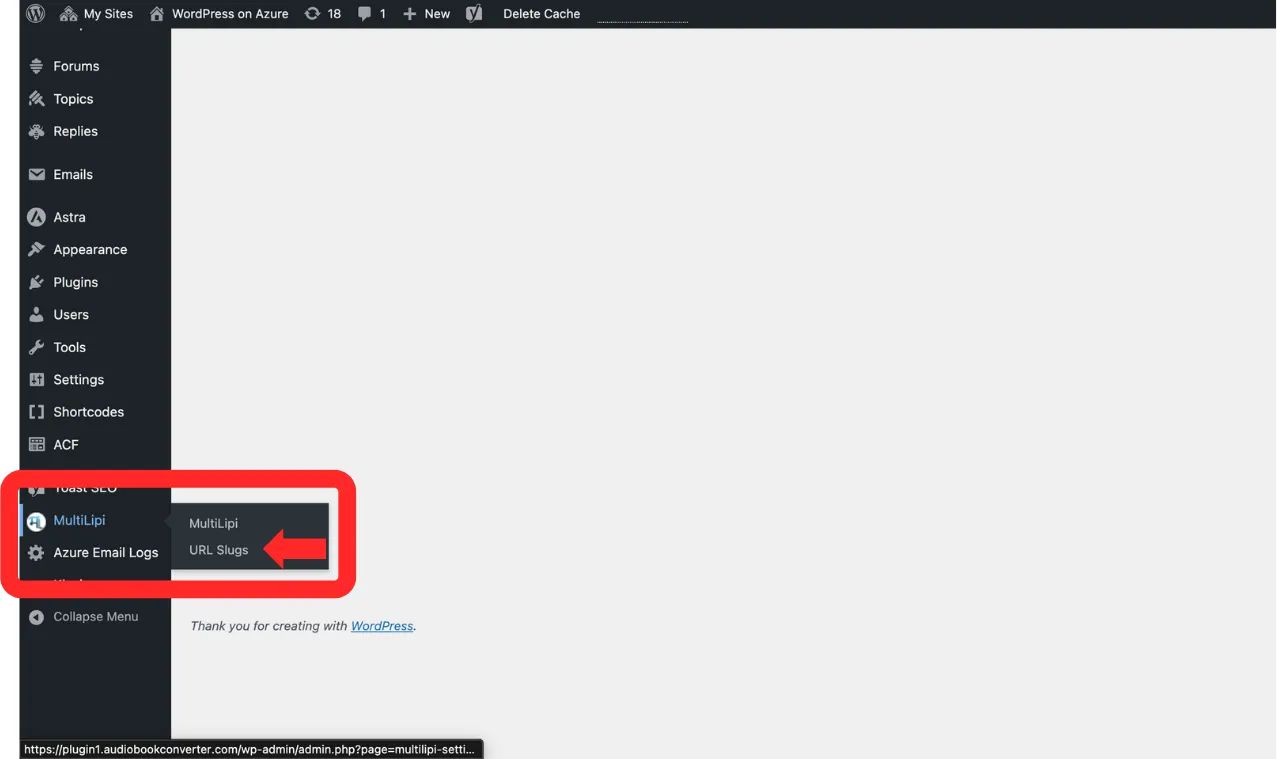
に移動 MultiLipi → URL スラッグ 言語:
ステップ 3: 新しいルールを定義する
クリック "+ 新しいスラッグを追加" ボタン。
新しい入力行が表示されます。スキーマを次のように入力します。
)間の明示的なマッピングルールを定義できます。 ターゲットロケールコードを選択します(例: hi — ヒンディー語).
元のパス: 既存のソースURLを入力します(例: /sample-page/). 注意: このページは既に存在している必要があります。
翻訳されたパス: 希望するカスタムスラッグを入力します(例: /अनुवादित-पृष्ठ/).
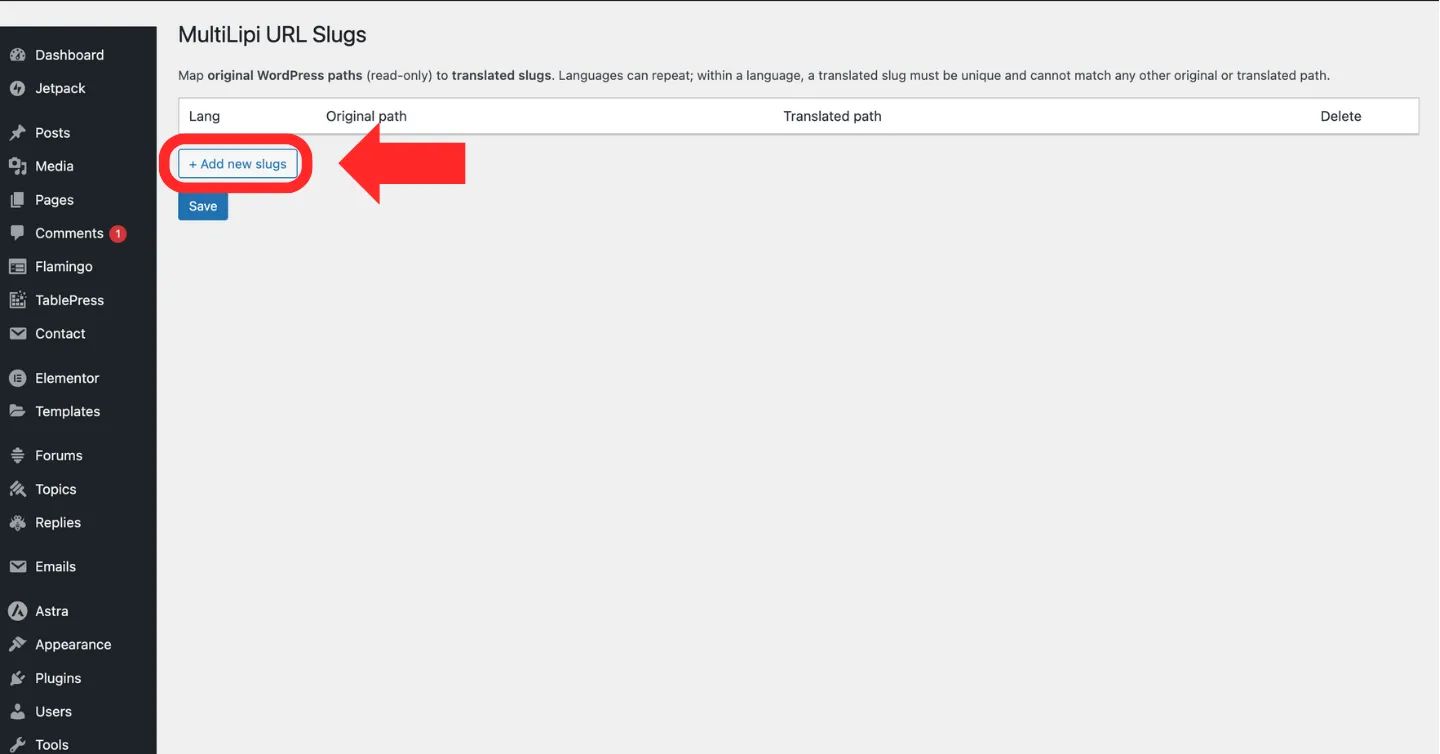
クリック "+ 新しいスラッグを追加" 新しい URL マッピングルールを作成するボタン
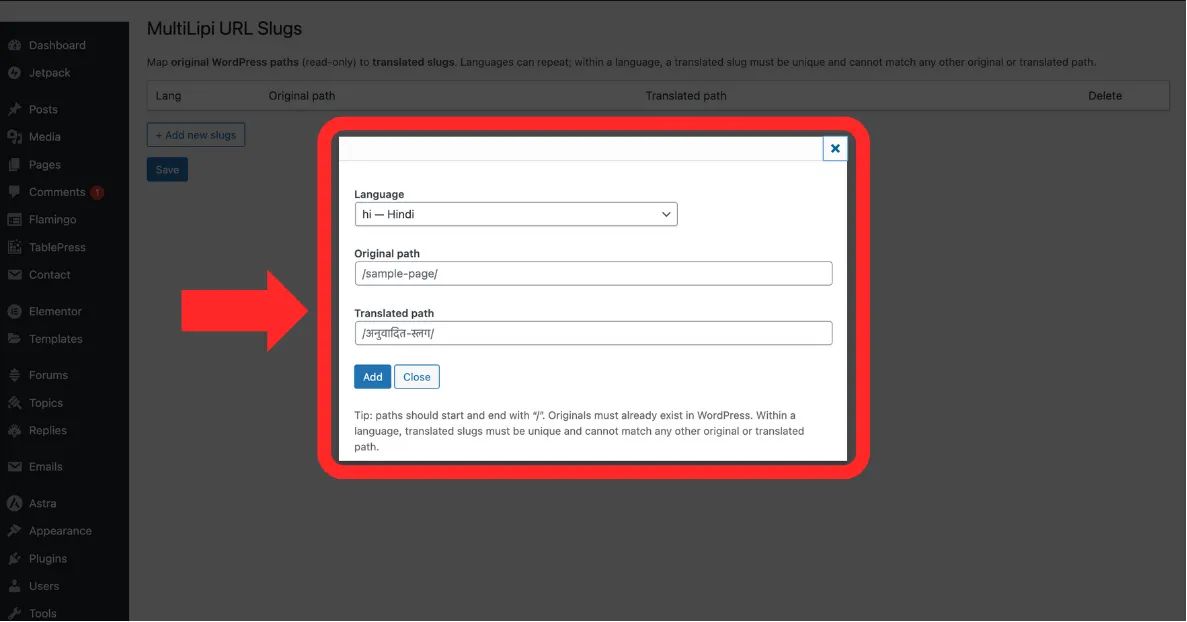
一意性 言語, 元のパス、そして 翻訳されたパス フィールド
ステップ 4: マッピングをコミットする
クリック 保存 プラグインは
システムアクション: ルーティングマップはすぐに更新されます。ヒンディー語で閲覧しているユーザーが翻訳されたパスにアクセスすると、正しいコンテンツが表示されるようになります。
3. 検証と制約
有効なパスのエンジニアリングルール。
ルーティングエラーや無限ループを防ぐため、システムは以下の厳格な制約を強制します:
スラッシュの一貫性
すべてのパス(Original と Translated)はスラッシュで始まり、スラッシュで終わる必要があります /.
正解: /about-us/
誤り: about-us
)とそのローカライズされたターゲット(例:
ザ・ 翻訳されたパス その特定の言語内で一意である必要があります。2つの異なるページを同じスラッグにマッピングすることはできません。
存在チェック
「ゴーストURL」をマッピングすることはできません。 元のパス WordPressサイト上の有効で公開済みのページを参照する必要があります。