
In a global infrastructure, the first second of a user\'s visit is critical. If a German user lands on your English homepage, they experience friction. MultiLipi\'s Visitor Language Redirector eliminates this by acting as an intelligent traffic controller. It inspects the incoming request headers and instantly routes the visitor to the localized version of your site that matches their browser preferences.
このガイドでは、 configuration protocol and the routing algorithms used to manage this flow.
1. The Detection Architecture
How the engine knows who is visiting.
The redirector operates on a strict logic flow based on the Accept-Language HTTP header sent by every modern web browser.
Interrogation:
A visitor lands on yoursite.com.
Analysis:
The engine reads the browser's language priority list (e.g., fr-FR, en-US).
Matching:
It checks your project's active languages.
一致が見つかりました:
The user is 302 Redirected to /fr/ immediately.
一致なし:
The user remains on the Default (Source) Language.
2. Configuration Protocol
Enable this automated routing layer directly from your project settings.
Step 1: Access Project Dashboard
Log in to your MultiLipi Dashboard.
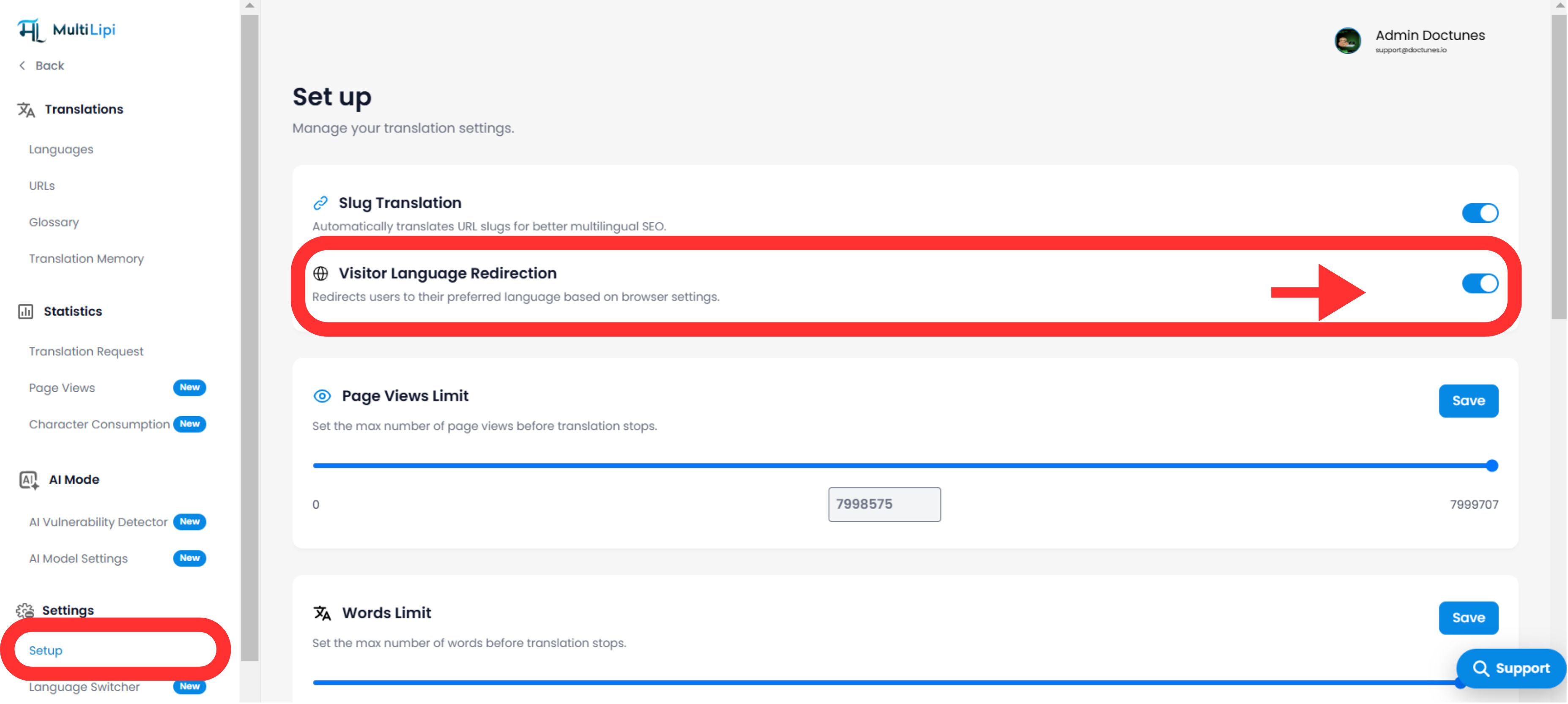
Step 2: Navigate to Setup
- •Go to Settings in the left-hand sidebar.
- •Select Setup from the sub-menu.
Step 3: Activate the Module
- •Scroll down to find the Visitor Language Redirector feature block.
- •アクション: Toggle the switch to
ON. - •Status: Active: The routing engine will immediately begin filtering and redirecting new traffic.
Routing Engine Activated
3. The Persistence Layer (Cookie Override)
Balancing automation with user control.
A common fear with auto-redirects is trapping users in the wrong language (e.g., an Englishman in Paris using a French computer). MultiLipi solves this with a Priority Cookie.
The Logic:
If a user is auto-redirected to French but manually uses the language switcher to go back to English, we set a Persistence Cookie.
The Result:
On their next visit, the system respects their manual choice over their browser setting. The user is always in control.
4. SEO & Indexing Harmony
Protecting your crawl budget.
This feature is engineered to be Search Engine Friendly.
Hreflang compatibility:
It works alongside your hreflang tags to ensure Google understands the relationship between your pages.
Bot Behavior:
Most search bots crawl without specific Accept-Language headers or are treated as "Neutral," ensuring they can still access and index your default content without getting stuck in a redirect loop.
5. Verification Protocol
How to test the route.
To verify the redirector is working:
Configure Browser:
Go to your browser settings (Chrome/Firefox) and change your preferred language to one you support (e.g., French).
Clear Cookies:
Open an Incognito/Private window (to bypass the Persistence Cookie mentioned in section 3).
Visit:
Type in your main URL (yoursite.com).
Observe:
You should be automatically routed to yoursite.com/fr/.
Success Indicator:
If the URL in your browser changes to include your target language code (e.g., /fr/ ), the Visitor Language Redirector is working perfectly.