MultiLipiの「ページビュー」ダッシュボードを理解する
 マルチリピ
•
2025年9月16日
•
5分で読めます
マルチリピ
•
2025年9月16日
•
5分で読めます
MultiLipiは、多言語SEOのパフォーマンスを追跡するのに役立つ強力な分析セクションを提供します。ザ ページビュー tab provides in-depth insights into how users interact with your translated website — showing where your traffic is coming from, which languages are used, and how different devices and browsers are being used to access your content.
このデータを最大限に活用できるように、ダッシュボードの各部分を分解しましょう。
翻訳依頼の統計情報を見つける場所
統計にアクセスするには、次の簡単な手順に従ってください。
- MultiLipiダッシュボードにログインします
- 左側のパネルに移動し、 プロジェクト
- Choose the project/website you want to analyze
クリック 統計→ページビュー サイドバーで
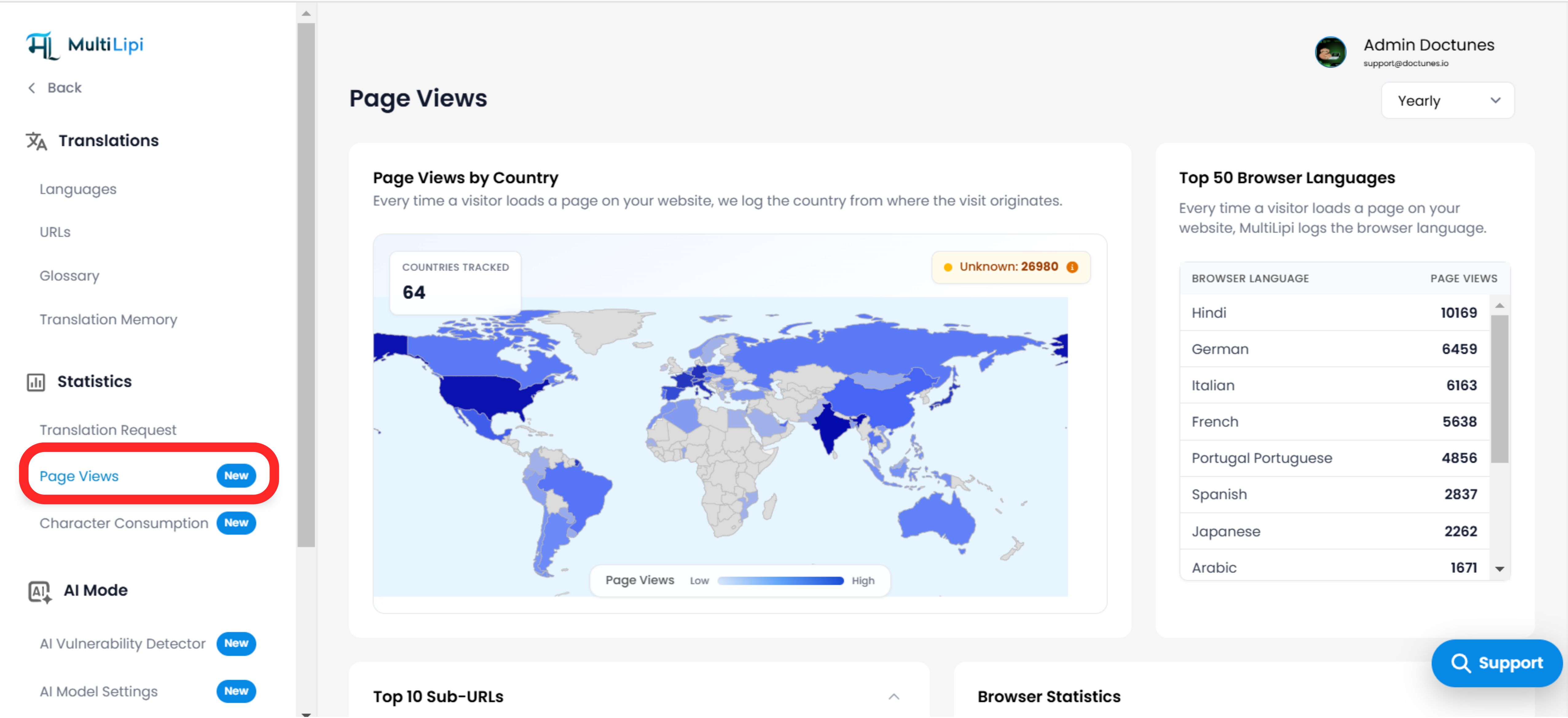
国別のページビュー
What it shows:
- 各国のページビュー数を強調表示する世界地図のビジュアル。
- マップは、ページビューの低から高を色分けして示します。
- 右上のバッジには、地理的位置を特定できなかった「不明な」トラフィック ソースの数が表示されます。
- 追跡された国の総数は左上に表示されます。
How it helps:
- あなたの識別に役立ちます パフォーマンスの高い国 .
- 明らか 潜在的な新しい市場 where users are visiting from, even if not yet localized.
- Essential for prioritizing future translations or campaigns based on geographical interest.
ブラウザ言語トップ50
What it shows:
- A ranked list of the top 50 browser languages detected when users visit your site.
- Example: Hindi, German, Italian, French, etc.
How it helps:
- どの 言語が最も一般的です among your visitors.
- 検証に役立ちます 言語選択 戦略。
- を案内できます。 言語オプションを追加する based on actual visitor demand.

上位 10 のサブ URL
What it shows:
- The most frequently visited translated pages (paths) on your website.
- エントリの例には、次のようなものがあります。 /, /プライシング , /blog/article/multilipi-2_0-features 等。
How it helps:
- どのページを把握できるか 最もグローバルなトラフィックを引き付ける .
- 評価に役立ちます 多言語SEOの影響 on different parts of your site.
- 必要とされる可能性のあるページを特定できる 手動翻訳の強化または最適化 .
ブラウザ統計
What it shows:
- A bar graph breakdown of how many visitors use each browser.
- Chrome、Firefox、Safari、Edge、Operaなどが追跡されます。
How it helps:
- 次の場合に便利 debugging frontend translation visibility特定のブラウザで。
- Can help prioritize ブラウザ固有のテスト 翻訳されたページ用。
デバイストラフィック
What it shows:
- 以下からのトラフィックの割合を表示するドーナツグラフ:
- デスクトップ
- モビール
- 錠剤
How it helps:
- Critical for ユーザーのやり取り方法を理解する with your site on different devices.
- 意思決定をガイドします。 レスポンシブデザインとモバイルパフォーマンスの最適化 .
- デバイスの傾向を特定するのに役立ちます。 さまざまな地域または言語 .
日付によるフィルタリング(年次/月次/週次)
右上隅のドロップダウンを使用して、 時間範囲で統計をフィルタリングする .これにより、次のことが可能になります。
- 長期にわたる成長傾向の追跡
- キャンペーンの効果を比較する
- 最近のユーザー行動と長期的なユーザーの行動に焦点を当てる
プロのヒント
- このデータを使用する in combination with your Translation Requests and Character Consumption stats to correlate traffic with translation activity.
- 国とブラウザの言語を一緒に見て、 identify high-priority localesローカリゼーションのために。
- コマンドの 上位 URL insight to find landing pages you can further enhance with glossary rules, human review, or improved UI.
コメント